Ask most CRMs what a "lead" is and you get a shrug. A form submission is a lead. A newsletter sign-up is a lead. Someone who emailed support once is a lead. The pipeline fills with people nobody is actually selling to, the real deals get lost among them, and the team learns to ignore the board.
Kydero draws the line in one place and keeps it there. A contact is a person: a name, an email, a phone, maybe a company. A lead is a deal you decided to work with that person. Every person is stored once. A lead is attached to them, sits in a pipeline stage, and has an owner. The same person can have several deals over time, but at most one is open.
What follows from that is simple to say and surprisingly rare in practice: nothing becomes a lead on its own unless the customer asked for it.
Where contacts come from
- Your digital card. Someone scans your card, fills in the form and ticks "just save my contact". They are saved as a contact, only, and never promoted later. They told you what they wanted.
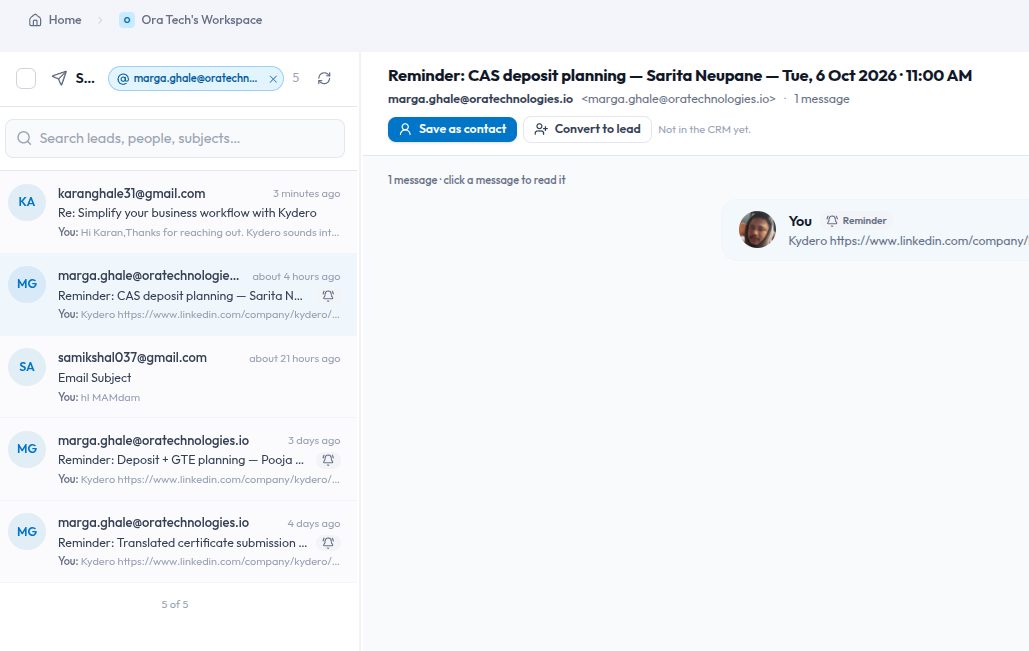
- An email from someone new. A stranger writes to your workspace address, or to a mailbox you connected. Kydero keeps the conversation and offers Save as contact under the sender line. One click, and every message with that address, past and future, is linked to the person.
- Compose. Write to an address that is not in the CRM yet and Kydero saves them as a contact automatically, so the thread has a home.
- Import, or the New contact button. A spreadsheet, or one person typed in by hand. Email or phone is required, because a name alone is a record nothing can act on.
Where leads come from
Two places, and only two.
The card visitor who did not tick the box. Leaving "just save my contact" unticked is the visitor saying "I want to hear from you". Kydero saves the person and opens a lead at once, owned by whoever owns the card, with a priority guessed from the signals: email and phone both given, captured at an event, or arrived through a referral means high. If they fill the form again later, the same lead is reused rather than duplicated. This is the one path where an automatic lead is right, because the visitor made the choice and the card owner published the card knowing that.
A person on your team deciding. Everywhere else, from a contact's page, from Mail, from the board, a lead is created through the New Lead form. When you convert a contact, the form opens with the person already filled in and locked, and asks for the three things only a human should decide: which pipeline, which stage, and who owns it. No defaults are chosen silently. The moment the lead exists, the person's earlier emails move onto it, so the lead's Email tab shows the whole exchange from the first message.
Where a new lead lands
Kydero is one CRM shaped per industry, so this question gets asked a lot. The answer is the same for every type.
- A stage someone chose explicitly wins. The pipeline follows the stage.
- Otherwise a pipeline someone chose, in its first stage.
- Otherwise, for card captures only, the card's own target pipeline. Each card can point somewhere different, so one company can run several cards feeding several pipelines.
- Otherwise the workspace's intake pipeline for leads arriving from outside, or the default pipeline, the one your board opens on, for leads created by hand.
An Education workspace, for example, seeds Student Admissions and Visa Services and marks Student Admissions as intake, so a card capture lands in Admissions and a counsellor later opens a Visa Services deal for the same student by hand. A single-pipeline business has intake and default on the same board. You can move the intake flag to another pipeline whenever your process changes.
What you see on the Contacts page
The Contacts page lists only people with no open deal: strangers who emailed, card visitors who asked to be a contact only, imports, anyone added by hand. The moment you convert someone, they leave Contacts and appear on the CRM board as a lead, with their details, emails and activity; archive the deal and they come back. One person, one place.
Open a contact and the first thing under their name is the deal strip. Either "In Student Admissions · Counselling, owned by Sita" with an Open lead button, or "Contact only, no lead yet" with Convert to lead. The page reads this from the deal record itself, never from a badge or a flag, so it cannot drift out of step with the board.
Changing your mind
Remove from pipeline on a contact's page archives the deal. The history, tasks and documents are kept, the person stays as a contact, and converting them again later restores the same deal instead of starting a second one. Nothing is thrown away by changing a classification.
And because people ask: what does Delete delete? Three different things, depending where you press it.
- Delete in Mail moves a conversation to Trash. Undo, Restore, purged after thirty days. The copy in your real mailbox is never touched.
- Delete contact removes the person record and their activity. Their emails stay in Mail. A person with an open deal cannot be deleted until the deal is removed from the pipeline.
- Delete lead removes the deal and its records. The person stays a contact, and their emails stay in Mail.
In other words, only Mail's own Delete ever removes an email, and even that is reversible for a month.
Why bother
Because a pipeline is only useful if every card on it is a deal somebody is working. When "lead" means something, the board tells the truth: the count is real, the owner is real, the stage is where the conversation actually is. Contacts stay findable without pretending to be sales. And the decision that matters, "are we going to work this?", is made by a person, in a form that asks the right three questions, instead of by whoever happened to send an email first.