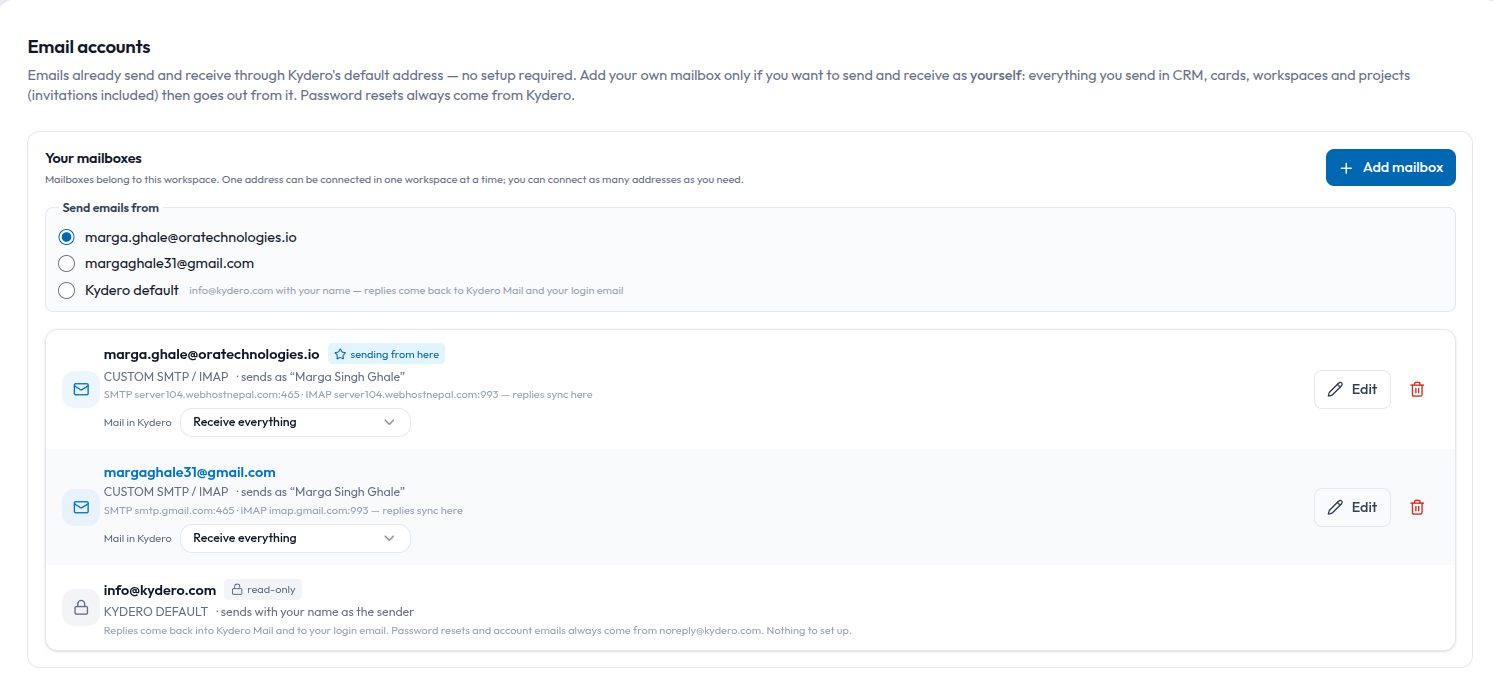
Every CRM sends email on your behalf. The question is whose name is on the envelope. Until you connect a mailbox, Kydero sends your customer mail from info@kydero.com with your name on it, and pulls the replies back into Mail through its own inbound address. That works on day one with nothing to configure. But a student, a buyer or a client who hits Reply sees a kydero.com address, and some of them notice.
Connecting your own mailbox fixes that. The same quotation, the same appointment invite, the same contract request now leaves from you, lands in your real Sent conversation on the other side, and the reply comes straight back into Kydero. This guide walks through what that means in practice, because the details are where people get stuck.
Three senders, one rule each
Kydero uses exactly three identities, and it never mixes them.
- System:
noreply@kydero.com. Password resets, invitations, the welcome after onboarding, "your card is live", the office calendar digest. Nobody is expected to reply, so no mailbox of yours is ever used for these. - Kydero default:
info@kydero.comcarrying your name. Every customer-facing email when you have not chosen a mailbox: lead emails and replies, Compose, campaigns, quotations and invoices, appointment invites, contract sign requests, the lead welcome. Replies reach Mail within seconds and thread onto the lead. - Your connected mailbox: your real address and your real display name. Same list as above, the moment you pick it under "Send emails from".
One consequence worth knowing: who sends decides the mailbox. A lead email goes through the lead owner's chosen mailbox even if a colleague clicked Send. Mail still records the colleague as the person who sent it, so the audit trail stays honest while the customer sees one consistent address.
Connecting a custom SMTP / IMAP account
Gmail and Outlook have one-click buttons that open the provider's sign-in. Everything else, which means cPanel hosting, Zoho, Yahoo, iCloud, a company mail server, goes through the custom form. Settings → Email accounts → Add mailbox → "Add a custom SMTP / IMAP account".
- Quick setup fills the server names for Gmail, Outlook / Microsoft 365, Yahoo, Zoho, iCloud and "Own domain (cPanel / hosting)". Typing a gmail.com address picks Gmail on its own.
- Fill the address, display name, SMTP host, port (587 with STARTTLS or 465 with TLS), username (defaults to the address) and password. The IMAP host follows the SMTP host until you type a different one; port 993; for most hosts the IMAP password is the same as SMTP.
- Press Test connection. Kydero logs in to SMTP and, when you gave one, IMAP, and shows a green or red line for each with the server's own reason. Nothing is saved yet.
- Press Connect. The same checks run again and the mailbox is refused if either fails, so a half-working mailbox is never saved.
The form has guard rails that came from real support cases. A host field refuses an email address or a URL on the spot. An IMAP host without an IMAP password is refused before dialling. Both dials give up after fifteen seconds and say so instead of spinning. And the result lines clear the moment you change any field, so an old red line never sits under a form you have since fixed.
The two gotchas
Use the hosting panel's server name, not mail.yourdomain.com. On many hosts, mail.yourdomain.com resolves to Cloudflare, which carries web traffic only. Ports 465 and 993 to it simply hang. Your cPanel shows the real server name, something like server104.webhostnepal.com; use that for both SMTP and IMAP.
Gmail as a custom mailbox needs an app password. Google does not accept your account password over SMTP. Create an app password under your Google account's security settings and use smtp.gmail.com 465 with imap.gmail.com 993. Or skip all of this and use the Connect Google button.
What changes once it is connected
Three controls appear on the mailbox card.
- Send emails from: one radio per mailbox plus Kydero default. The first mailbox you connect in a workspace becomes the sender by itself; after that nothing changes your choice but you.
- Mail in Kydero: Receive everything, Receive only CRM mail (replies to Kydero mail and mail from people who are already contacts; the rest is dropped and never fetched again), or Don't receive. Sending is unaffected by this setting.
- Edit: change hosts, ports, usernames, display name or TLS without disconnecting. A blank password keeps the saved one. Test and Save verify first.
Replies are pulled back into Mail every minute for custom IMAP mailboxes and every ten minutes for Gmail and Outlook. A reply to a lead email lands on that lead. Files the customer attaches are filed on the lead under Documents; signature logos and tracking pixels are recognised as decoration and never filed.
If your mailbox breaks, because the password changed or the server is down, Kydero marks it with an error in Settings and sends that email from info@ instead so nothing is lost. Every mailbox in error is re-checked every fifteen minutes and comes back on its own when the login works again. One refused recipient, where the server says the address does not exist, fails only that one email with the server's reason; Kydero does not resend it from another address because it would bounce again.
One address, one place
A workspace in Kydero is a company. A mailbox belongs to one member and lives in one workspace, and an address is connected once in the whole system: not twice in a workspace, not in two workspaces, not by two people. If you try, Kydero tells you where it already lives and offers Move here. That rule exists because the alternative is one company's replies appearing in another company's Mail, which is the kind of mistake you only make once.
Within those limits, connect as many addresses as you need. A consultancy might have a counsellor sending from her own name, the office sending from admissions@, and the owner keeping Kydero default for the odd message.
What stays the same
Account mail stays on the platform by design. Deleting in Mail is still Kydero-only and reversible: Trash with Undo and Restore, purged after thirty days, and the copy in your real mailbox is never touched. One honest limit: custom SMTP sends do not append to your provider's Sent folder, so Kydero's Mail page is the record of what left.
Connecting a mailbox takes about three minutes if you have the server name and the password to hand. After that, your customers see your name, your replies land in one place, and the CRM stops looking like a third party in your own conversations.